
Posts

Life after Lockdown

Image
If you are reading this blog in April-2020, there is a high probability that you are reading this from your home while following government guidelines for lockdown. At this point, almost each and every part round the globe is under lockdown to contain COVID-19 from spreading further. Whole world is now well aware of the challenge and threat posed by the growing pandemic of COVID-19 the Corona Virus. As on today, there is no cure and based on experts opinions and past experience, we are few months away from finding a cure (may be vaccination or medicine). Since the virus is highly contagious and spreading exponentially, so till the time we don't have cure, the best way to contain this Virus from spreading further is Social Distancing and Lockdown. Lockdown means  confining of people to their respective areas (home, society, city, country) in order to regain control of the situation. In current situation, Lockdown is much required to ensure that this Corona Virus don'...
Gmail tricks - create unlimited siblings of your Gmail address

Use (+) to create unlimited siblings of your Gmail address Many times, you need multiple email accounts for testing and the options you have is to create free accounts imaging if you have to create 100+ accounts for testing and then to test you have to open each and every account to check for the emails. A simple workaround is to get a gmail account and just append a plus (“+”) sign after your email address and after that, you can insert any combination of words or numbers to create any number of personalized email IDs with the same inbox. For instance, if your current email ID is  myname@gmail.com , you can modify email to  myname +sibling1@gmail.com  or  myname +sibling2 @gmail.com  or use any combination to still receive an email with the same ID,  myname@gmail.com . Hence using this Gmail trick, you will be able to create multiple aliases of your primary ID and that too without tweaking any setting or configuration. Tips: You c...

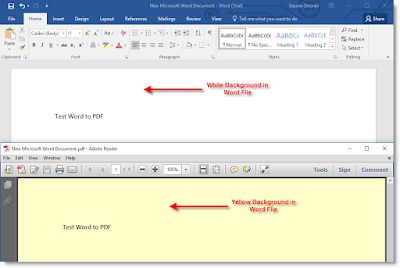
Yellow Background issue in Word to PDF conversion

Image
For those who are use to save Word file as PDF might have faced the issue of Yellow background in PDF file post saving (see screenshot)  Below are the simple steps to resolve this issue. You can set a background color for a Word document, but it is only visible in  Web Layout . The background will appear white in  Print Layout . Use the  View  tab's  Document Views  group,  Web Layout  command to see it one has been set. If it has, it can be removed from the  Page Layout  tab's  Page Background ,  Page Color  options. Normally, the colored page background would not print. However, there is a Word Option to  Print background colors and images . Click the  Office button, Word options, Display  and look in the bottom section,  Printing Options  for  Print background colors and images  and unchecked it. Hope this help.

Classic Start Button for Windows 8

After moving to Windows 8, one of the major issue faced by most of the traditional Windows users is the unavailability of Start Button / Menu. I tried to get use to Metro interface on my laptop (without touchscreen) but never got settled. I find it really tedious to see my development tools lost in the Metro Style window and thereafter every time I need to search the apps. I missed the classic start menu where all my install programs are well organized the way I used to see them. Because of my corporate policy, I am stuck with Windows 8. After searching on net, I did found a free software which brings the Start Menu back on Windows 8.  Classic Shell™ is free software that improves your productivity, enhances the usability of Windows and empowers you to use the computer the way you like it. The main features are  classic start menu with multiple styles and skins. You can download the same at http://www.classicshell.net/ . Hope this helps to Windows 8 users who are...

Pointing GoDaddy domain to an AWS EC2 instance

You just bought a domain on GoDaddy and if you would like to leverage the same with your AWS EC2 instance then just follow these easy steps to make it possible: First setup AWS to provide an IP address for your DNS settings. On EC2 Management console you will have a vertical menu on the left hand side. Under “NETWORK & SECURITY” group click on “Elastic IPs”. On the top menu you will see a blue button “Allocate New Address” click on it. Just be sure “EIP used in” is set to “EC2″ then click “Yes, Allocate”. A new IP address will be created on the table, select it by clicking on the empty square by the left of the name. Now click on “Associate Address” on the pop-up click on instance and select the instance you would like to associate to this IP. Finally click “Associate” and that’s it. For now to access via SSH, FTP, etc. you will need to use the new elastic IP. On the GoDaddy side we will set up the points to address with the new elastic ip. Login into your godaddy ...

Office365 - Set up the device to synchronize with Microsoft Exchange

You can use a mobile phone, tablet, or other supported device to access information in your mailbox. Here is great article from Microsoft to enable this for Office 365 Exchange accounts:  set up the device to synchronize with Microsoft Exchange

Web Sitemap Generator Tools

List of tools that generate or maintain files in the XML Sitemaps format, an open standard defined on  sitemaps.org  and supported by the search engines such as Ask, Google, Microsoft Live Search and Yahoo!. https://code.google.com/p/sitemap-generators/wiki/SitemapGenerators

Android Fix: "Insufficient storage available"

If you have Android phone for few months which is running on version 4.2 or less,  while updating your apps  you might have faced issue of  "Insufficient storage available" . Resolution : Try to clear data from the play store in the application manager.  If that doesn't work, clear it again along with Google services framework.  You need to sign in to your Google account again. But this helps for sure. Enjoy updating apps on android.

Could not load file or assembly 'Microsoft.SharePoint.ApplicationPages'

Recently I received following error on SharePoint: Could not load file or assembly 'Microsoft.SharePoint.ApplicationPages, Version=12.0.0.0, Culture=neutral, PublicKeyToken=71e9bce111e9429c' or one of its dependencies. Access is denied. … In the error, we can see that obviously we do not have permission, but who is trying to access the DLL? It is not the Application Pool account, but the Anonymous IIS account.  Simple fix, check to see what account is running in Directory Security, give read permission to that user for the _app_bin folder, and recycle the application pool. Should be fixed. 

Sql Script Generator

During project development you might have come across a situation where you need Insert script along with values from SQL Table. Found a very useful tool  SQL Script Generator   at CodePlex.  SQL Script Generator is a tool for generate INSERT/UPDATE statement SQL script. With SQL Script Generator you can create script to copy data from one database to another.

Shrink LDF file in SQL SERVER 2005

I recently encountered an issue on one of our development box, where SQL log files on C:\ and transaction logs grew to 13GB, on the other hand the DB size is just 29 MB. Used following SQL query to reduce the size of log file to free up the space ALTER DATABASE [DBNAME] SET RECOVERY SIMPLE; GO --Shrink the truncated log file to 1 MB. DBCC SHRINKFILE ( [DBNAME_LOGFILE_NAME] , 1); GO --Reset the database ALTER DATABASE  [DBNAME] SET RECOVERY FULL; GO

Corrupt WMI Causing SharePoint Provisioning to Fail

Image
Recently our team ran into an issue where SharePoint where solution deployment is failing with following errors. After troubleshooting and going through the forums it was suspected that WMI might be corrupt on the Windows 2003 Server hosting SharePoint. To confirm the suspicion that WMI was indeed corrupt, we used the wbemtest.exe utility to check connectivity. Click Connect: Click Connect, using the default values: If no error is thrown, you have successfully connected to the local machine via WMI. If “Not Found” error message is received, you indeed have a corrupted WMI instance. To further test, you could execute the following WMI query to test the specific class SharePoint is querying during search provisioning, using the following example: If you received an error message when trying to connect, you can attempt to re-register the WMI .dll’s and .exe’s using the following seven steps: 1. Disable and stop the Windows Management Instrumentation service. 2. Right-...

Mutual SSL Authentication

Detailed introduction to Mutual SSL Authentication by Elvin Cheng. http://www.codeproject.com/Articles/326574/An-Introduction-to-Mutual-SSL-Authentication

WCF WSDL location address Issue resolved when hosted over HTTPS with basicHTTPBinding

Image
Recently I was working on a WCF web service which needs SSL implementation using basicHttpBinding, so that the service remains inter-operable and cater to native clients. Everything was going well, I was able to host my web service over HTTPS (I will detail out the configuration for the same in section below). But when I deployed on Server, following errors were received when proxy is generated: " Metadata contains a reference that cannot be resolved: " " The WSDL document contains links that could not be resolved." The issue lies with the WSDL which generates the location url with client machine name, which restricts generation of appropriate proxy over Internet because it will never be able to resolve machine name over internet. Here is what the Soap Address location and WSDL Import location look like in my WSDL: < soap:address location ="https://MachineName.mydomain.com/MyService/Service.svc" /> < wsdl:import   locati...

IE9 rendering issues table offset at random columns

Today while developing an ASP.NET application using AJAX to display the Search Result, I encountered a weird issue. My aspx p age contain a Repeater control with ItemTemplate to display free flow data in HTML Table .  Issue What seems to happen though, is that one or two rows in the loaded table, will have its data offset at a random column.   You can find the details of issue in following articles: http://stackoverflow.com/questions/7267014/ie9-table-has-random-rows-which-are-offset-at-random-columns http://social.msdn.microsoft.com/Forums/en-AU/iewebdevelopment/thread/28d78780-c95c-4c35-9695-237ebb912d90 Resolution The problem was with extra white space between td nodes causing IE9 render a dynamically generated table incorrectly, in my case to misalign a cell within a table.  Same code rendered perfectly fine in IE6, IE7, IE8, FireFox 4, Chrome 10, but not IE9.  Try one of the following Adding to the head element [me...

How to get the IUSR and IWAM user account passwords

Open up command prompt and navigate to C:\Inetpub\AdminScripts. Then type: cscript.exe adsutil.vbs get w3svc/anonymoususerpass If everything goes well, you will see the following with the password in ***** format: C:\Inetpub\AdminScripts>cscript.exe adsutil.vbs get w3svc/anonymoususerpas Microsoft (R) Windows Script Host Version 5.6 Copyright (C) Microsoft Corporation 1996-2001. All rights reserved. anonymoususerpass : (STRING) "**********" To display the IUSR and IWAM account passwords in cleartext, you need to open C:\Inetpub\AdminScripts and edit Adsutil.vbs in Notepad. Find this line: If (Attribute = True) Then IsSecureProperty = True Else IsSecureProperty = False End If and change it to: If (Attribute = True) Then IsSecureProperty = False Else IsSecureProperty = False End If Now run the script commands above again and you will see the passwords in clear text. Of course, please make...

Prevent Recursive Workflows in SharePoint

When creating Workflows in SharePoint, you might have encountered issue when workflow recursively call itself and  tell the workflow to run automatically when an item is updated [approved], then because the workflow is updating the item its goes and calls itself again! This is known as recursive workflows, commonly known as an "infinite looping" in a workflow. To avoid this issue we just need to a dd a condition to the Workflow and only update list or document library item on certain condition. I found an interesting Microsoft article  Run a workflow when a specific field changes Also there is a video which also s how how the conditions prevent recursive workflows.

Display Percentage Values on a Pie Chart (Report Builder and SSRS)

By default, categories are shown in the legend to identify each value. If you have labeled the pie chart using category labels, you may want show percentages in the legend. To display percentage values as labels on a pie chart Type  #PERCENT  for the  Label data  option. (Optional) To specify how many decimal places the label shows, type "#PERCENT{P n }" where  n  is the number of decimal places to display. For example, to display no decimal places, type "#PERCENT{P0}". Click here  for Microsoft Technet Article for more details.

SharePoint Garbled Email Issue

Recently I came across an issue where ‘Alert Me’ emails originated from SharePoint environment are getting garbled and reaching the customers in following format. Resolution   After troubleshooting it was found that somehow recent patch on Exchange Server was adding a line break in Internet Email header messing up the Header itself, which was garbling the Email body and it was showing something like this.  On  analyzing multiple garbled email headers and comparing them to working email header it was found that these garbled messages were missing the “Reply To” address. Setting up the ‘Reply To’ address in SharePoint Admin for the Farm fixed the issue. Note that this issue was only with ‘Alert Me’ email relaying outside the company to extranet users, within companies Email Addresses there seems to be no issue.  Also a point to note that this entry was missing for last 2 years and we never faced this issue, nothing was changed on SharePoint server when...

SharePoint WSS 3.0 AD Account Creation Mode "The specified domain either does not exist or could not be contacted."

Being a SharePoint Administrator you might have come across a requirement where it is required to setup a SharePoint found in ‘Active Directory account creation mode’. Active Directory account creation mode  this mode is used by Internet Service Providers to create unique user accounts for customers in Microsoft Active Directory service. These accounts can then be assigned to groups in Windows SharePoint Services to grant customers the appropriate level of access. After successful setup when everything was working fine than we noticed that we are not able to create any user in the Active Directory. We were getting following error The specified domain either does not exist or could not be contacted. (Exception from HRESULT: 0x8007054B) After weeks of troubleshooting and looking into every aspect of AD access issue, SharePoint ULS Logs we came across a Microsoft article http://support.microsoft.com/kb/828813 which state: This problem may also occur if y...